What Is Split Tunneling?
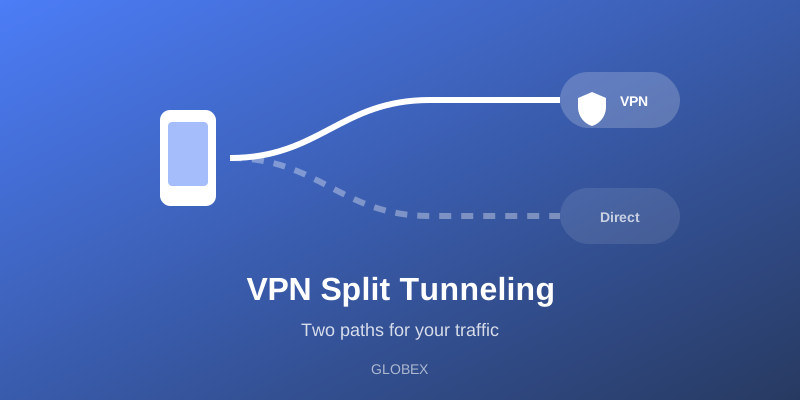
In short: split tunneling is a VPN feature that divides your internet traffic into two paths. Some of it travels through the encrypted VPN tunnel, and the rest goes directly to the internet the normal way. Instead of an all-or-nothing choice — everything through the VPN or nothing at all — split tunneling lets you decide which apps or destinations get the tunnel.
Think of it like a road with an express lane. The VPN tunnel is the protected lane; split tunneling is the system of signs deciding which cars use it and which stay on the open road.
How Split Tunneling Works
When a VPN is active on your device, the operating system routes network traffic into a virtual network interface — the tunnel — where it's encrypted and sent to the VPN server. Split tunneling adds a routing decision in front of that step:
1. An app (or your browser) makes a network request.
2. The routing rules check whether that app or destination is on the tunnel list.
3. Tunneled traffic is encrypted and sent through the VPN server, which forwards it to its destination. The destination sees the VPN server's IP address.
4. Excluded traffic leaves your device directly through your regular connection. The destination sees your real IP address, and your internet provider can see where it's going.
On Android, this is built into the platform itself: the VPN framework lets a VPN app include or exclude specific applications from the tunnel (per-app split tunneling). Other implementations split by destination instead — routing certain websites or IP ranges outside the tunnel — or do the reverse ("inverse split tunneling"), where only selected apps use the VPN and everything else stays direct.
Why Would You Want It?
1. Local services that break under a VPN
Some services refuse connections from VPN server addresses or behave oddly when your apparent location changes: banking apps with strict fraud detection, some streaming services, or delivery apps that need your real local region. Excluding just that one app keeps it working while everything else stays protected.
2. Speed-sensitive traffic
Encryption and the extra hop to a VPN server add some overhead. For large game downloads or video calls where every millisecond of latency matters, some users prefer to route that specific traffic directly while keeping browsing and messaging inside the tunnel. (For competitive gaming trade-offs, see our guide to VPNs for gaming.)
3. Local network devices
Printers, smart-home hubs, and file shares live on your local network. A full tunnel can make them unreachable from your device. Split tunneling that keeps local traffic local solves this without disconnecting the VPN.
4. Bandwidth management
If a VPN plan meters data, excluding heavy non-sensitive traffic stretches the allowance. This matters less on services with unlimited bandwidth, but it is a common historical reason the feature exists.
The Security Trade-Offs — Read This Part
Split tunneling is a deliberate hole in your protection, and it's important to be honest about that:
- Excluded traffic is fully exposed. Your real IP address is visible to every excluded destination, and your internet provider can see and log that traffic exactly as if no VPN were running.
- Misconfiguration is silent. If you exclude your browser and forget, you can spend a whole session believing you're protected when you're not. The VPN icon in your status bar stays on either way.
- Mixed identity. Websites can potentially correlate your VPN identity and your real identity if related traffic flows on both paths — for example, an excluded app and a tunneled browser session logging into the same account.
- On untrusted networks, split tunneling is usually the wrong choice. On public WiFi, the entire point is that every packet leaves your device encrypted. Excluding anything reopens the exact attack surface you connected the VPN to close.
A good rule of thumb: use split tunneling to solve a specific, named problem ("my banking app rejects VPN connections"), not as a default configuration. When in doubt, tunnel everything.
Split Tunneling and GLOBEX
GLOBEX's focus is making the full tunnel effortless: open the app, tap Connect, and your traffic is encrypted with no configuration required — the free tier includes unlimited bandwidth and the same 8 connection protocols as Premium, so there's no data cap pushing you to exclude traffic. If a specific app misbehaves under any VPN (banking apps are the classic case), the simplest reliable workaround on any provider is to disconnect briefly, use the app, and reconnect. You can see everything the app includes on our features page, and the free plan details on the free VPN page.
Frequently Asked Questions
Does split tunneling weaken the encryption of tunneled traffic? No. Traffic inside the tunnel is encrypted exactly as it would be with a full tunnel. The trade-off applies only to what you exclude.
Can websites tell I'm using split tunneling? Not directly. Each destination just sees whichever path its traffic arrived on — the VPN server's address, or your real one.
Is inverse split tunneling safer? It fails safer, in one sense: with "only these apps use the VPN," new apps default to the direct path; with "everything except these apps," new apps default to protection. If privacy is the goal, exclude-lists (full protection by default) are the better posture.
Conclusion
Split tunneling is a routing tool, not a security upgrade: it trades protection on selected traffic for compatibility, speed, or local access. Used deliberately — for one problem app, on a trusted network — it's genuinely useful. Used carelessly, it quietly removes the protection you think you have. Know which of your traffic is in the tunnel, keep the exceptions short, and when the network itself is untrusted, tunnel everything.